
SOFElink Equipment Digital Platform
For SOFElink Equipment Digital Platform, the useful part is the technical context around Intelligent Control Products: application, operating condition, image reference, and the fields that matter when an engineer checks the request.
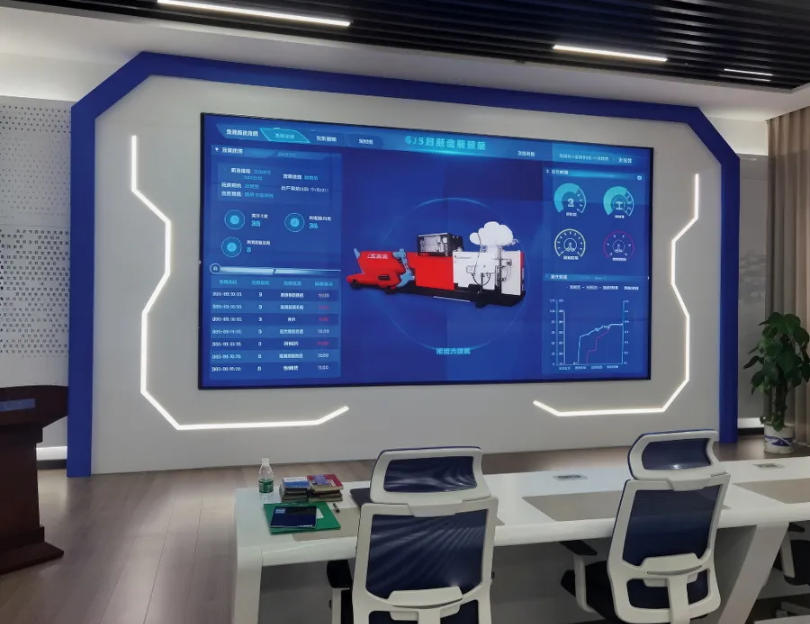
For SOFElink Equipment Digital Platform, the useful part is the technical context around Intelligent Control Products: application, operating condition, image reference, and the fields that matter when an engineer checks the request.
Product Parameters
| Product Family | Intelligent Control Products |
|---|---|
| Product Name | SOFElink Equipment Digital Platform |
| Product Scope | Product Detail |
| Equipment Family | Intelligent control products |
| Typical Use | Equipment control, data acquisition, monitoring, training or digital operation support |
| Procurement Focus | Control interface, communication protocol, display layout, data recording, integration boundary and service support |
| Documents To Confirm | I/O list, control architecture, communication requirement, software scope and FAT procedure |
| Engineering Review | Pressure, flow, power, material, dimensions, standards and certification data are confirmed through engineering review for each quotation or datasheet request. |
Product Features
- Control and data-centered architecture
- Supports local or remote operation workflows
- Designed for integration with equipment packages
- Clear RFQ path for interface and data requirements
- Equipment monitoring and control rooms
- Cementing, fracturing, mixing or nitrogen control
- Digital field data acquisition
- Training, simulation and fleet operation support
Buyer Review Notes
For SOFElink Equipment Digital Platform, buyers usually check the duty window first: where the equipment sits inside Intelligent Control Products, what it is expected to do on site and which operating condition will define the quotation. That is usually the step where procurement and engineering stop talking in general terms and start comparing real fit.
In the next step, the commercial file matters just as much as the technical one. Buyers often want the drawing package, packing expectation, delivery timing, spare-parts scope and any test record that supports supplier qualification. If SOFElink Equipment Digital Platform is being compared with Instrument Truck, the comparison should stay on duty, not on catalogue language.
When the project is new or the site condition is still moving, it is better to send the supplier a small but exact data set than a broad keyword request. A good RFQ for SOFElink Equipment Digital Platform should answer what the job is, where it will be used, what limits apply and what documents will be reviewed before release.
What To Send With The First RFQ
1. Job Scope
Describe whether SOFElink Equipment Digital Platform will be used for equipment monitoring and control rooms or for a related project condition. The supplier needs the duty before they can compare configuration.
2. Technical Boundary
Include pressure, flow, power, connection, material, dimension or temperature limits when they are known. Even a partial datasheet helps engineering choose the correct package.
3. Commercial Data
Add quantity, destination country, target delivery schedule, packing expectation and whether the order is for new equipment, replacement parts or a service package.
| RFQ Item | Why It Matters |
|---|---|
| Product name or model | Confirms the product family and avoids a wrong quotation. |
| Application or site condition | Shows whether the equipment is meant for drilling, cementing, stimulation, downhole work or another duty. |
| Drawing or photo | Helps identify compatibility when a formal part number is not available. |
| Inspection or certificate need | Lets the supplier prepare the right quality and shipping documents. |
FAQ
What is the normal buyer review path for SOFElink Equipment Digital Platform?
Most buyers first confirm the application inside Intelligent Control Products, then compare the technical boundary, documents and delivery scope before sending the RFQ.
What should procurement prepare before asking for a quotation?
Start with the model, application, destination country, quantity and any required inspection or packing note. A short but exact message usually gets a better technical answer.
What should engineering check first?
Engineering should check duty fit, connection or package form, pressure or capacity target, materials and any site-specific restriction that could affect supply.
Is a drawing or photo useful?
Yes. A drawing, nameplate photo or old part photo reduces guesswork and helps the supplier confirm whether the request is a standard unit or a custom case.
Can this page support a spare-parts request?
Yes. If the enquiry is for replacement items, include the equipment reference, old part mark, installation position and the quantity needed for the maintenance plan.